AI coach · v0.44.1
How the AI coach works
When you upload a replay, a few things happen before the coach writes anything. This article walks through them in order so you know what the coach actually saw before it judged your play.
The short version
Your .SC2Replay file isn't something an AI model can read directly. It's a recorded log of every click and event from the game, packed into a binary format. So the engine has to do four things before the coach gets a turn:
- Replay the file and pull out structured events.
- Stack reference data on top: what each unit costs, who counters who.
- Run rules over those events to flag battles, power spikes, and named plays.
- Hand the model a tidy summary and ask for coaching notes.
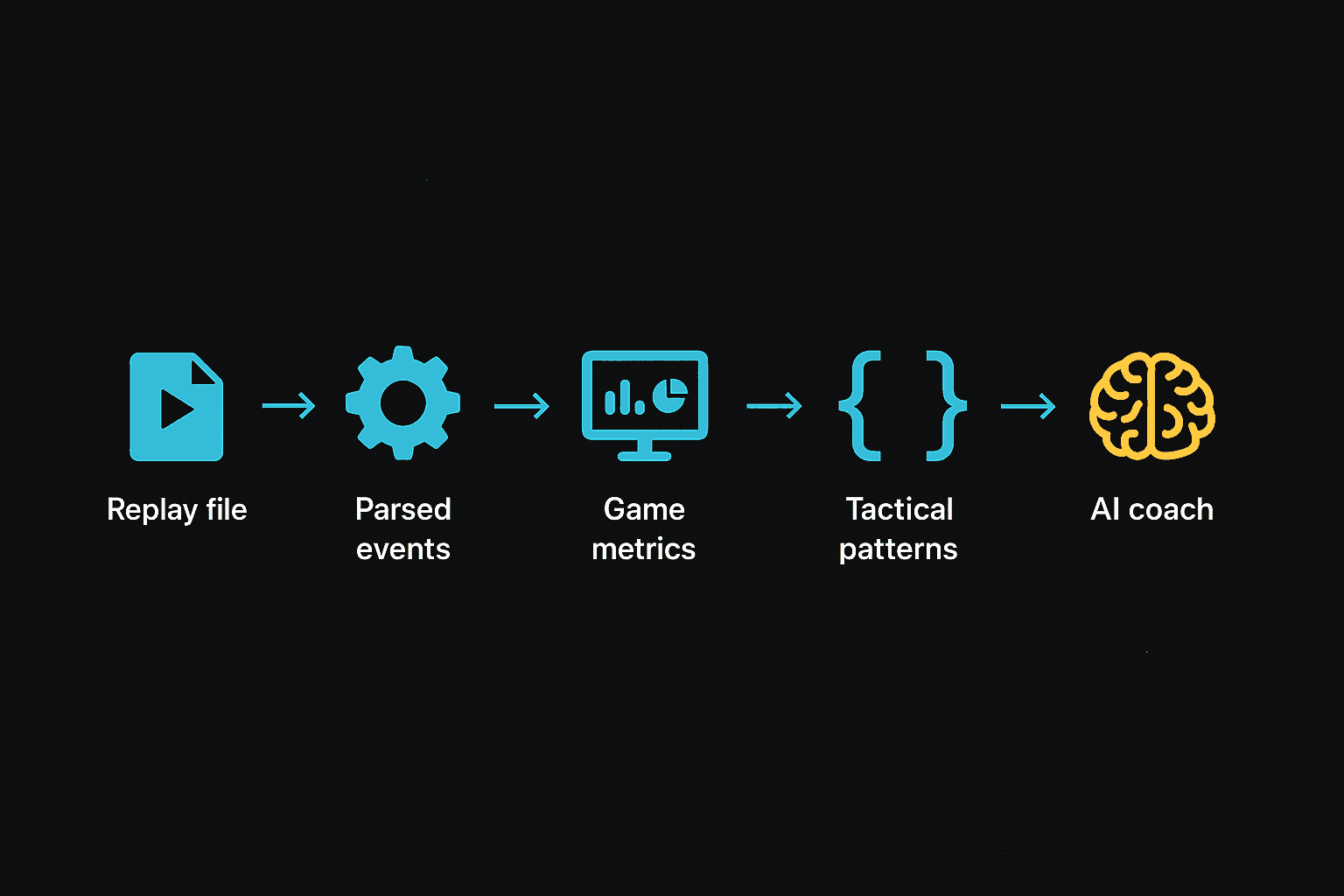
Each step below corresponds to one of those stages. None of it's magic. The model only sees the same numbers you can see in the replay viewer, just laid out as text.
Inside a replay file
A StarCraft 2 replay isn't a video. It's the recorded sequence of events the game engine already processed: every unit that was built, every order issued, every ability cast, every kill. To play one back, the game replays the events in order against a fresh simulation.
We do the same thing, but instead of rendering the game we tally what happened. After the parser runs, we have a structured snapshot of the match: the map, who played, their build orders, their unit production, every kill, and position data we can use for heatmaps later. Brood War replays go through a different parser but produce the same shape.
The interesting part is the timeline. Every 30 seconds of game time we record:
- Worker count per player
- Supply used and supply cap
- Mineral and gas income rate
- Unspent minerals and gas (the bank you see in the UI)
- Every unit currently alive on each side
- Number of bases mining
- APM
That timeline is what the rest of the engine reasons against. It's also what the coach ends up reading, formatted as text.
For the long version of every block the parser pulls out — players, build orders, kills, position tracks, ability events — see the full reference:
What's inside a parsed replay →The reference data we layer on top
The replay tells you a Marauder fired at a Roach. It doesn't tell you a Marauder costs 100/25, takes 21 seconds to build, or does an extra 10 damage to anything tagged Armored. That kind of static knowledge has to come from somewhere else.
We keep a hand-checked table of every unit in the game with its cost, hit points, attack damage, range, the layer it occupies (ground or air), and what kind of bonus damage it does. Same for every structure. The numbers are pinned to patch 5.0.13, the last balance patch the game shipped.
We track named abilities the same way — energy cost, cooldown, range, radius, and which units can cast each one. That lets the coach reason about whether a player had the bar to cast a Force Field or whether Yamato was off cooldown when a fight started.
Both tables are on their own pages:
The tactics we recognize
Long before the coach gets involved, the engine watches for named tactical plays. 25 of them, all detected by deterministic rules. Stuff like:
- The double extractor trick: two extractors started at the same time, one cancelled within 12 seconds.
- A cannon rush: a forge and at least one photon cannon built closer to the opponent's base than to your own.
- A drop: a medivac, warp prism, or overlord-transport entering enemy territory between four and twelve minutes with at least four units of cargo.
- A recall escape: a Mothership recall fires while your army is in the opponent's territory and workers are dying.
The detector is dumb on purpose. Each rule reads the timeline and either fires or it doesn't. We don't ask the AI model to recognize tactics, because we want the coach to be able to interpret a known play with shared vocabulary. So when a Reaper run-by happens at 3:30, the coach gets "reaper_harass at 3:30, evidence: 4 reapers entered opponent main, 12 SCVs lost in 18s." Not a blob of raw events to figure out for itself.
Each entry in the catalog also tells the coach whatnot to flag. The temporary worker dip during a double extractor trick is correct execution. The high drone count during power-droning is the signature of the opener, not a sign of poor production. Without those notes, the coach would call out a clean play as a mistake.
Browse the full tactics catalog →From raw events to actual insights
The replay file gives us facts. It doesn't give us interpretation. A few small algorithms sit in the middle, turning raw numbers into the things a human would want called out.
Battle detection
We slide a 15-second window across the kill events. A window counts as a battle when both sides lose at least 50 resources of value within it, and the combined loss is at least 250. Both thresholds matter. The combined floor keeps a single Hellion poking a worker line from showing up as a battle. The per-side floor keeps a one-sided base race off the list when only buildings die. We label each battle a skirmish, an engagement, or a major fight based on how much was destroyed.
Power spikes
We walk the timeline looking for stretches where one team's army value sits at least 30% higher than the other's for more than 15 seconds. The leading side also has to have a real army (at least 500 resources of it), so the early game doesn't spam spikes when both sides have ten zerglings. The output is a list of windows: "Team 1 was 1.6x ahead from 8:30 to 9:15." The coach uses those windows to ask whether the leading team converted the lead into anything.
Scouting and aggression timelines
From the unit positions we already have, we work out where each player's army was sitting minute by minute (own side, midmap, opponent's half, inside opponent base) and when their vision crossed each opposing base. Without those two timelines, a coach would judge "you turtled" or "you pressured" from build shape alone. Sometimes the build looks aggressive but the army never moved out. That's wasted production at home, not pressure. The aggression timeline keeps the coach honest about what actually happened.
Matching what you built against pro builds
One thing that helps the coach a lot is knowing which recognizable opening you played. So we keep a catalog of 51 named pro builds — 1-rax reaper expand, 2-1-1 medivac, 12 pool, the usual suspects — each one with a list of timing benchmarks pulled from real pro games on SpawningTool.
For every player in the replay, we score every archetype by counting how many of its benchmarks the player actually hit within ±90 seconds. Then we hand the coach the top three matches with confidence labels: STRONG, MODERATE, or WEAK. The coach is told to only name an opening ("you opened 12 pool") when the match is STRONG. Below that, it describes what the player actually built without putting a name on it. Naming a build the player didn't play is worse than describing it generically.
The same catalog also drives our standalone build order library, where you can read each one straight through with the supply timings and key benchmarks:
What the AI coach actually reads
All of the above gets serialized into a structured text document. Not JSON, not embeddings, just sectioned plain text the model reads top to bottom. The order matters. We put authoritative ground truth first and interpretation later, so the model anchors on facts before it starts reasoning.
- Game metadata: map, duration, mode
- Teams and players
- Base lineage: when each expansion went down
- Per-player build orders and upgrades
- Timeline snapshots: workers, supply, army value, mining rate, unspent resources
- Battles, with the units involved and what was lost
- Tactics catalog and the detected sequence for this game
- Scouting and aggression timelines
- Top three build matches with their confidence labels
- Power spike windows
The system prompt sets the rest of the rules. It defines what a critical, important, or minor mistake looks like. It tells the coach not to call a missed benchmark a mistake unless the lateness clearly hurt the player. It tells the coach that "you pressured" is only true if the player's army actually moved out, not just because the build shape looked aggressive.
The model behind the writing
The coach itself is Claude Opus 4.7. We tested it head-to-head against Sonnet on a real game and Opus came back with tighter root causes, more accurate timestamps, and a more useful selection of moments to call out. It costs more per run, which is why each coaching note costs a mineral. If you spend 1 mineral on the per-replay coach, this is what runs.
The model returns a JSON document with an overall assessment, per-team strengths and mistakes, time-pinned moments with severity tags, and a short list of improvement priorities. We persist that, stamp it with the AI coach version, and the next viewer reads it back. There's no recompute on view. When you see v0.44 on an analysis, that's the prompt that produced it.
What it doesn't do
A few honest caveats:
- No frame-by-frame micro grading. The coach reads from per-30-second snapshots and event-level data. It can see that forcefields landed during a fight. It can't tell you whether your splits were optimal.
- No co-op coaching yet. The coach's knowledge is ladder metagame. Co-op missions have different unit kits, commander mechanics, and AI behavior. Trying to coach one of those returns an apology, not a coaching note.
- Team game MMR is partial. The replay format only stores MMR for player one in team games. The other slots come back blank. That's a Blizzard limitation, not a parser bug.
- Build matching has a recall floor. The archetype catalog has 51 entries. Truly off-meta or experimental builds match weakly to everything, and the coach falls back to describing the build by shape instead of putting a name on it. That's by design. Naming a build the player didn't play is worse than describing it generically.
Bugs, suggestions, or interesting data points → team@starcraft2.ai. The source is on GitHub if you want to read the actual code.
Reviewed against AI coach v0.44.1. The running history of prompt changes lives on the changelog.